PCI Compliance: How to Make WordPress PCI Compliant – A Helpful Guide
PCI compliance rules were established by the Payment Card Industry (PCI) to help improve data security and reduce fraud. Although PCI DSS is not a government regulation, most businesses that accept credit card payments are contractually required to follow PCI compliance requirements through their payment processor, merchant account provider, or acquiring bank. Failure to comply can result in fines, increased processing fees, security risks, or even the suspension of your ability to accept credit card payments.
In other words, banks and payment processors may provide the technology to accept payments, but merchants are still responsible for the way they process and store sensitive credit card data, and any fraudulent activity that may arise from that. Even in the absence of liability rules, PCI compliance is a good idea since these data security guidelines help protect your business and customers from fraudulent attacks.
Quick Answer
WordPress PCI compliance means operating your payment website according to the PCI Data Security Standard requirements that apply to your business and payment setup. A compliant payment processor can reduce your exposure to card data, but it does not automatically make the entire website compliant. Merchants still need appropriate security controls, SSL encryption, software updates, access restrictions, vulnerability reviews, employee training, and the required validation or reporting for their merchant level.
A useful analogy is the seatbelt. In New Hampshire, for example, adult drivers aren’t technically “required” to wear them. But because seatbelts save lives, you should buckle up anytime you’re in a car.
What Is WordPress PCI Compliance?
If your WordPress website accepts online payments, PCI compliance should be part of your overall website security strategy. While WordPress and WooCommerce can support a PCI-compliant ecommerce environment, compliance is not automatic.
Website owners are responsible for choosing secure payment processors, maintaining website security, and following applicable PCI DSS requirements. The sections below explain the key steps involved in making a WordPress website PCI compliant.
PCI Compliance in the Online World
PCI-compliant fraud protection is essential for all businesses. It’s particularly important in e-commerce since buyers and sellers never meet face to face. With no way to independently verify the identities of anonymous shoppers, online credit card fraud is now a $6.4 billion industry for criminals. The biggest targets of fraudulent attacks are usually the smallest players. According to some estimates, 60 percent of all cyberattacks are directed toward small to medium businesses because these merchants often lack the technical know-how and resources to protect themselves. Fortunately, a growing number of e-commerce tools have begun placing greater emphasis on fraud management — from shopping carts to plugins to content management system (CMS) suites. If you currently use platforms such as WordPress or WooCommerce, becoming PCI-compliant is easier than ever before. But it’s not automatic. There are steps you must take to make your website compliant with the Payment Card Industry’s data security guidelines. Those steps apply to any merchant accepting credit card transactions whether you rely on Drupal, Joomla! or Magento to run your business. As WordPress is the most widely used CMS suite, and the WooCommerce plugin is arguably the most popular e-commerce platform, we’ll use these tools in the examples below.
WordPress PCI Compliance Checklist
If your website accepts online payments, use the checklist below as a starting point for improving PCI compliance:
✓ Choose a PCI-compliant payment processor
✓ Determine your PCI merchant level
✓ Complete the appropriate self-assessment questionnaire (SAQ)
✓ Perform vulnerability scanning and security reviews
✓ Install and maintain an SSL certificate
✓ Enable additional payment verification measures
✓ Keep WordPress, plugins, and themes updated
✓ Use malware scanning and antivirus protection
✓ Train employees on payment data security best practices
✓ Review compliance requirements regularly
End Your WordPress Headaches with our Website Upkeep Maintenance Services
Keep your WordPress website updated, secure, backed up, and working properly without managing every technical detail yourself. Our team provides reliable ongoing support when you need it.
WordPress PCI Compliance: Taking Steps to Protect Yourself
The most important starting point involves choosing a PCI-compliant payment processor. If your provider doesn’t follow the latest security best practices, none of the other steps on this list matter. Choose a processor that can provide you with a secure payment gateway. Once this is done, you can move on to the next steps.
1. Determine your merchant level
The PCI compliance rules change depending on the transactional volume of your business. To know what guidelines you must follow, you must determine your merchant level type. If you’re like most small businesses, you probably qualify for Level 4 — which has the easiest compliance process. To be sure, you should verify your status first.
2. Self-assessment questionnaire
The next step involves taking a self-assessment questionnaire (SAQ) to determine your current risk exposure. These tests can seem overwhelming at first, but most of the questions require simple yes/no responses.
3. Approved scanning vendor
Although not always required, it’s a good idea to include an approved scanning vendor (ASV) that can use automated tools to detect potential vulnerabilities in the software and hardware that manages payment data.
Not sure whether your website has security vulnerabilities that could affect compliance? Run our free website security scan to identify common security issues and potential risks.
4. Security policies and training
The steps above will push you toward PCI compliance, but to remain compliant, you also need to stay on top of:
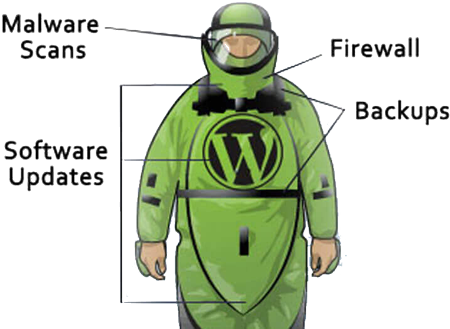
- Software updates
- Security patches
- Antivirus protection
- Malware scanning
In addition, you must train your employees how to properly manage payment information — preferably on a need-to-know basis. It also helps to have everyone select long, alphanumeric passwords for all logins.
CHECK YOUR SITES SECURITY SCORE FOR PCI COMPLIANCE
• Find Vulnerabilities in the Code
• Detect Malware Infections
• Check Website Encryption
5. Secure sockets layer certificate
A secure sockets layer (SSL) certificate is an add-on credential that lets online shoppers know they have a direct, encrypted connection with your website (instead of a copycat’s). Once this SSL certificate is installed, your site’s domain will have an extra “s” at the end of the “http” prefix (i.e., https).
6. More verification details
For an online sale to go through, most e-shopping carts require the cardholder’s name, account number and expiration date. These represent the bare minimum in security, especially given that online fraud leads to billions in annual losses. Therefore, you should consider also requiring additional authentication details such as billing addresses and card verification values (CVVs).
7. The right plugins and tools
Technically speaking, WordPress isn’t PCI-certified. Neither is WooCommerce, for that matter. However, both were designed from the ground up, with security in mind. For example, WordPress comes with admin controls that allow you to restrict access for each individual user. WooCommerce never stores credit card details, making it impossible for thieves to get their hands on payment data. Learn more in our companion article; WooCommerce and PCI Compliance. You don’t have to choose these specific tools, but whatever platforms and plugins you use should come with comparable levels of compartmentalization and control.
WordPress PCI Compliance — One Final Step
There’s one last piece of the puzzle: You need to share all of the above with your payment processor and bank to earn “PCI Compliance” status (and you must send quarterly reports to remain in good standing). True compliance isn’t a one-time fix. As fraudulent strategies evolve, the steps used to prevent future attacks must also change over time. If you have questions about PCI compliance, or if you’re not sure how to get started, you can refer to the accompanying infographic. It covers many of the most popular myths and misconceptions that small online businesses have about payment security.
Need Help With Your WordPress Website?
Tell us what is not working, what you want to improve, or what you are trying to build. Our WordPress experts will help you identify the clearest path forward without recommending work you do not need.
Need Help Securing Your WordPress Website?
Maintaining PCI compliance requires ongoing attention to website security, software updates, malware monitoring, and vulnerability management.
Our WordPress maintenance plans help businesses keep their websites secure, updated, and protected against many of the common issues that can put PCI compliance at risk.
Whether you’re running a WooCommerce store or another ecommerce platform, proactive website maintenance can help reduce security risks and improve overall site health.
Frequently Asked Questions
Does using WordPress or WooCommerce automatically make a website PCI compliant?
No. WordPress and WooCommerce can be used as part of a PCI-compliant ecommerce environment, but compliance is not automatic. The website owner remains responsible for the payment setup, security practices, software maintenance, access controls, and PCI DSS requirements that apply to the business.
What is the most important first step toward WordPress PCI compliance?
The article recommends starting with a PCI-compliant payment processor and secure payment gateway. This helps reduce the amount of sensitive payment information handled directly by the WordPress website, although the merchant must still complete the other security and validation steps that apply.
What is a PCI merchant level?
A PCI merchant level is a classification generally based on the number and type of card transactions a business processes. The merchant level helps determine which validation requirements apply, such as the appropriate self-assessment questionnaire and whether vulnerability scanning is required.
What is a PCI self-assessment questionnaire?
A self-assessment questionnaire, or SAQ, is a PCI validation document used by eligible merchants to evaluate their payment environment and confirm whether required security controls are in place. The correct SAQ depends on how the business accepts and processes card payments.
Why are WordPress updates important for PCI compliance?
WordPress core, themes, and plugins can develop security vulnerabilities over time. Installing updates and security patches helps reduce the risk that an attacker could exploit outdated software and gain access to the website or payment-related systems.
Is an SSL certificate enough to make a WordPress website PCI compliant?
No. An SSL certificate encrypts information exchanged between the visitor and the website, which is an important security measure, but PCI compliance also involves payment processing, access management, vulnerability controls, malware protection, policies, employee training, and ongoing validation.
How often should a business review its PCI compliance?
PCI compliance is an ongoing responsibility rather than a one-time website fix. Businesses should review their requirements regularly, keep security controls current, complete required reports or scans on schedule, and confirm expectations with their payment processor or acquiring bank.


Rodney Laws is an ecommerce expert with over a decade of experience helping entrepreneurs build and grow online businesses. He specializes in reviewing ecommerce platforms, optimizing user experience, and guiding brands toward higher conversions. His insights have been published on leading industry sites including UsabilityGeek, G2, Spendesk, and PPC Hero.
As the editor at EcommercePlatforms.io, Rodney combines hands-on knowledge with clear, actionable advice to help business owners choose the right tools and strategies. When he’s not testing the latest software or analyzing trends, he’s sharing practical tips that make complex ecommerce decisions simple.