WordPress Plugin Vulnerability Scan Tools – 4 Ways to Check Your Site
Say a total stranger walks up to you and offers you a delicious-looking lollipop.
Do you grab it and stuff it in your mouth?
Probably not.
Most people know better than to accept stuff from strangers. But when it comes to the internet, our sense of self-preservation often flies out the window. We don’t think twice when complete strangers walk up to us in the digital world, show us a shiny new plugin and ask us to install it on WordPress sites. Yet, vulnerable plugins account for more than 30% of all hacked WordPress sites.
Today, you’ll learn how to check WordPress plugin vulnerabilities that might compromise your site – and what to do if you’ve installed a vulnerable plugin unwillingly.
Quick Answer
To check a WordPress plugin for vulnerabilities, search trusted vulnerability databases before installing it, scan your existing WordPress installation for known security issues, avoid nulled or abandoned plugins, and download plugins only from reputable sources. If a plugin is listed with an unpatched vulnerability, deactivate and remove it, install a secure replacement, and scan the entire website because an attacker may already have used the weakness to introduce malware or gain unauthorized access.
It’s not only WordPress site owners who are too trusting of online strangers. Tons of people fork over their passwords, personal information, and other sensitive data to complete strangers online without a second thought. Even the most prominent people are tricked into revealing their personal information online. Not long ago, a UK hacker tricked White House officials into revealing sensitive information. The fact that the hacked White House staff were part of the U.S. cybersecurity task force shows that it’s easy to be too trusting. You need to be proactive here.
So, let’s get to it, then. How do you check for vulnerabilities in WordPress plugins? Well, before you start checking, you’ll need to know what a WordPress vulnerability is and what it’s not.
What’s a WordPress Vulnerability?
A vulnerability is a weakness. In computer-speak, it is a weakness in a piece of computer software, one that’s capable of being exploited. A nefarious person can use it to gain unauthorized, full access to a computer system. If you install a WordPress plugin with a vulnerability, attackers can use the vulnerability to access your WordPress dashboard, dump data from your mailing list, and, if you run an e-commerce store, grab as much of your customer’s data as they can.
Installing a vulnerable WordPress plugin sounds pretty serious, doesn’t it?
It’s like willingly ingesting a parasite. Only this particular parasite comes equipped with network communication capabilities. And it uses those abilities to invite other parasites to pilfer all your WordPress websites.
How to Check WordPress Site for Plugin Vulnerabilities
Fortifying your WordPress installation requires you to stop every attempt a hacker makes to get a foothold. Since the WordPress core is one of the most secure in the Content Management System ecosystem you only have stop and do some checking before you install that next plugin. So, how do you do that?
Tired of All These WordPress Headaches Yet?
Tired of All These WordPress Headaches Yet?
Download our FREE GUIDE:
The Secret Recipe to Make Any WordPress Website BOMB-PROOF 💣
1. Check Whether the Plugin is Listed in the Online Vulnerability Databases
Before installing a plugin on a WordPress site, the first thing you want to do is check relevant vulnerability databases. The WPScan Vulnerability Database, the National Vulnerability Database, and Exploit-DB are good places to start.
Go to these websites, type in the name of the plugin, click search, and you’ll get a list of vulnerabilities like the one below:
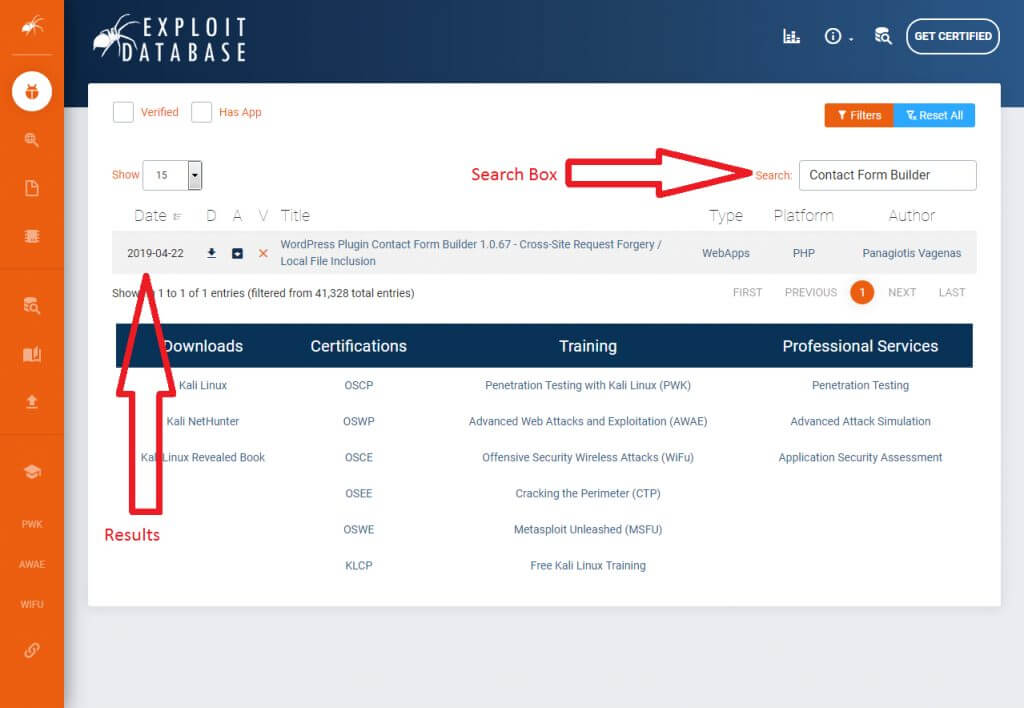
Exploit Database shows WordPress Plugin Contact Form Builder version 1.0.67 has cross-site request forgery and local file inclusion vulnerabilities. These are two of the most severe vulnerabilities, according to the Open Web Application Security Project (OWASP).
If your plugin shows up on these databases, check its homepage to see if the developers updated or patched the vulnerability. Then, if they have, make sure you download the updated version of the plugin before installing it on your WordPress websites. If they haven’t, deactivate the plugin immediately if it’s already installed.
2. Scan Installed Plugins for Vulnerabilities
If you’ve already installed a couple of plugins without checking whether they’re vulnerable, you need to go back and scan them using a WordPress security scanner.
Vulnerability scanners work pretty much like the scanners you find in airports. If they detect something off with a plugin, they notify you. They use an existing database of all known vulnerabilities to check your site code for these scripts.
There are many WordPress security scanners, but perhaps the most popular scanner is the WPScan plugin.
WPScan isn’t your typical WordPress plugin. When you install it, WPScan starts by checking if other plugins on the site are vulnerable to known attacks. It also checks whether users on the site have weak passwords, whether the passwords can be brute forced, and other miscellaneous items such as your WP directories, themes, custom directories, and configuration settings. It does all of these without needing extended permissions. That means even if a hacker somehow infiltrates your WPScan installation, there’s nothing he or she can do because it’s almost impossible to escalate from WPScan to full-site exploitation.
End Your WordPress Headaches with our Website Upkeep Maintenance Services
Keep your WordPress website updated, secure, backed up, and working properly without managing every technical detail yourself. Our team provides reliable ongoing support when you need it.
Free Website Security Scan
Is website malware silently attacking your website visitors?
3. Don’t Install Discontinued or Cracked Plugins
Never download nulled/discontinued plugins or cracked versions of premium plugins.
Cracked versions of premium plugins have their code modified to remove the authors’ licensing requirements without paying. It’s not too far-fetched to think that the hacker making the modification added something extra to allow them access to any WordPress website using the cracked plugin.
Use a tool like RIPS to check if the plugin files you just downloaded are part of a cracked version of the plugin. If it finds similar files, then the plugin most likely has security issues.
4. Always Download Plugins from Reputable Sites
This is more of a precaution than a countermeasure, but it’s your best chance at avoiding vulnerable WordPress plugins. Go to the official WordPress repository whenever you want to download a plugin. The team behind this site vets many plugins before they’re released to the public. Downloading a vulnerable WP plugin from the official repository is exceedingly unlikely.
Here’s a search for a Contact Form Builder plugin.
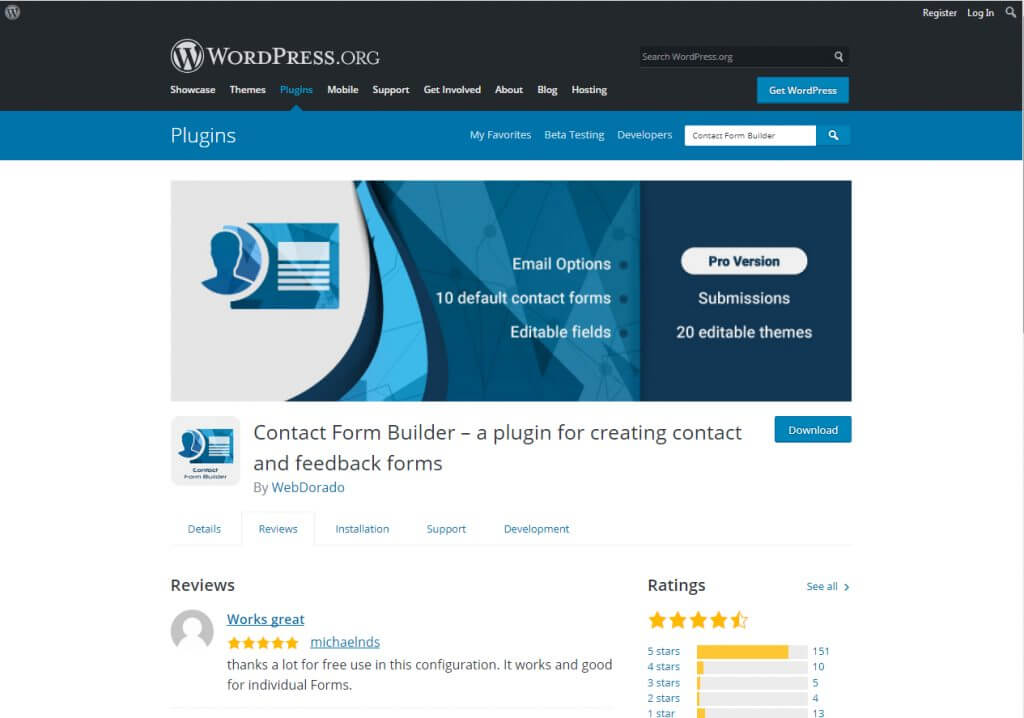
See the Details, Review, Installation, Support, and Development tabs right under the name of the developers? You’ll want to check out each tab. That should tell you if other users had problems with the plugin and whether it’s prone to future attacks.
If you can’t tell if a plugin is vulnerable or not on the official WP repository website, head over to the plugin’s official page and try to look for red flags. Also, check if the plugin developer is reputable, and glance over their TOS and Privacy Policy. If everything checks out and the plugin is recently updated and enjoys active support, go for it. If everything about the plugin is outdated, start looking for an alternative.
Tired of All These WordPress Headaches Yet?
Tired of All These WordPress Headaches Yet?
Download our FREE GUIDE:
The Secret Recipe to Make Any WordPress Website BOMB-PROOF 💣
Need Help With Your WordPress Website?
Tell us what is not working, what you want to improve, or what you are trying to build. Our WordPress experts will help you identify the clearest path forward without recommending work you do not need.
In Conclusion
By following these simple steps, you’ll never have to worry about installing vulnerable plugins. You don’t have to be scared of strangers gaining access to your website data, and selling it to who knows where on the dark web.
Moving forward, if you’ve just discovered that one of your plugins is vulnerable, disabling it and removing it from your site is the first step, but if your website is already infected, that might not solve the problem. The plugin may have already allowed numerous known malware onto your site. Reach out to us, and we’ll work to undo any damage caused by a rogue plugin or website malware!
Frequently Asked Questions
How can I tell whether a WordPress plugin has a known vulnerability?
Search the plugin name and version in reputable vulnerability databases before installation. If the database lists a security issue, check whether the developer has released a patched version. Do not install an affected version, and deactivate it immediately if it is already active on the site.
What should I do after discovering a vulnerable WordPress plugin?
Update the plugin if a verified security patch is available. If no patch exists, deactivate and remove the plugin and replace it with a maintained alternative. You should also scan the entire website because removing the plugin does not undo malware, unauthorized users, or other changes that may already have occurred.
Is updating a vulnerable plugin enough to secure the website?
Not always. An update closes the known weakness, but an attacker may have exploited the old version before it was patched. Review administrator accounts, scan for malware and altered files, change relevant passwords, and investigate unusual website activity.
Are plugins from the official WordPress repository always safe?
The official repository is generally safer than an unknown download source, but no plugin can be guaranteed to remain vulnerability-free. Review its update history, support activity, compatibility, user feedback, developer reputation, and known security reports before installing it.
Why are nulled or cracked WordPress plugins dangerous?
Nulled plugins have been modified to bypass a paid license, so their code is no longer controlled solely by the original developer. The modified files may contain hidden malware, backdoors, spam scripts, or other changes, and they may not receive legitimate security updates.
How often should installed WordPress plugins be checked?
Check for updates and security notices continuously as part of routine website maintenance. Automated monitoring can help identify newly disclosed vulnerabilities, but important alerts should still be reviewed promptly and affected plugins should be patched or removed without delay.
Can a vulnerable plugin compromise data outside WordPress?
Yes. Depending on the vulnerability and the website configuration, an attacker may gain access to WordPress accounts, customer records, mailing-list data, server files, connected services, or ecommerce information. The potential impact depends on the permissions and systems available to the compromised website.


Levi is the Founder & CEO of Hog The Web, a web design and WordPress services company delivering high-performance websites since 2015. With over a decade of hands-on experience in building, maintaining, and securing websites, Levi leads his team with a focus on craftsmanship, reliability, and long-term client partnerships. Outside the web world, he’s passionate about nature, sustainable living, and giving back through local non-profits and youth education.