WE CAN HELP
WordPress Traffic Drop
Diagnosis & Recovery
Lost Google traffic or rankings and not sure what happened? We diagnose WordPress SEO traffic declines, determine what the evidence actually points to, and implement the repairs when there is something to fix. No guesswork, blanket content rewrites or mystery audit PDFs.
Not sure what caused the drop? See the warning signs we investigate, or watch a real client recovery story.



Search Console
Find lost pages, queries and search types
WordPress
Inspect crawl, indexing and website changes
Fix + Verify
Prioritized implementation, not just a report
Imhoff Case
Documented recovery after a 97% decline
First, Find Out What Actually Fell.
An apparent traffic crash could mean fewer Google clicks, less search demand, broken analytics, lost rankings on a few important URLs, or a technical WordPress problem. Those situations call for different responses. We compare the right dates, channels, pages and queries before touching a live site.
Our SEO and development team can take the findings straight into WordPress, from recovering missing pages to repairing indexation and URL issues. Explore the common causes in our guide.
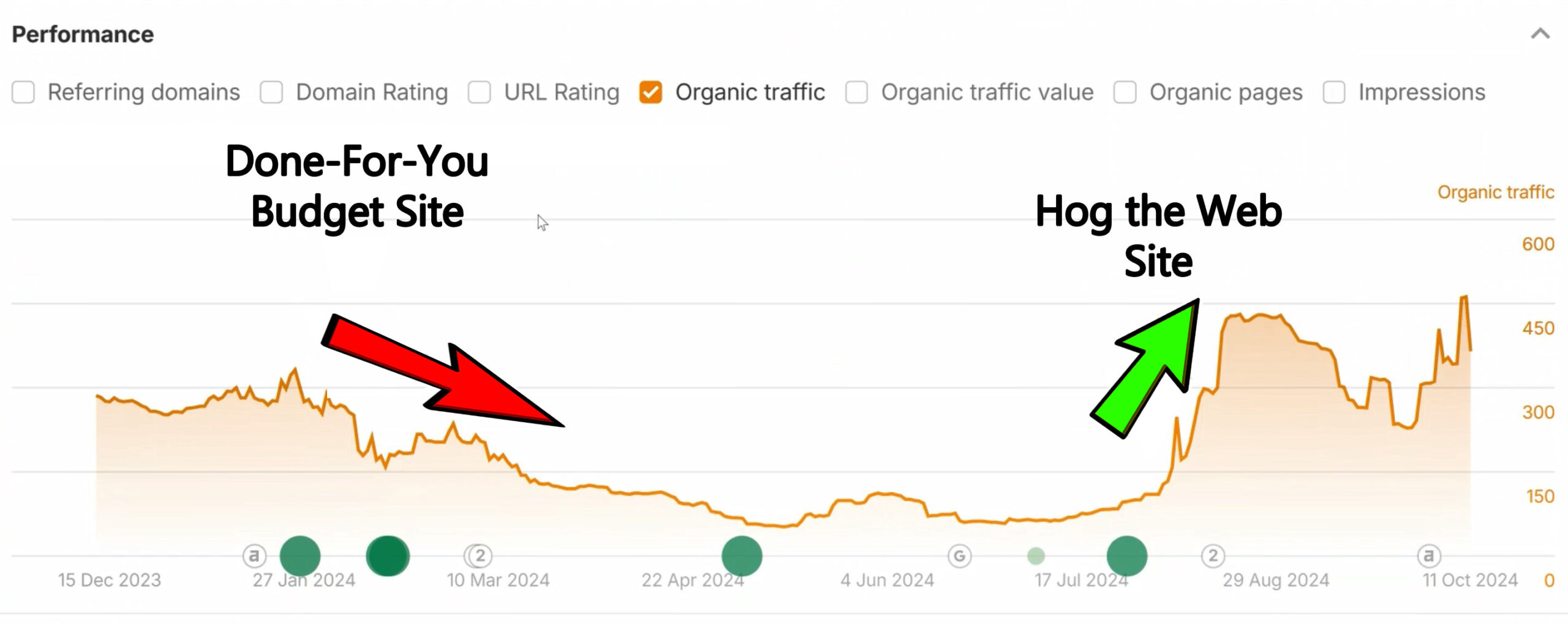
Real Ahrefs traffic-estimate chart from the Imhoff recovery case study, showing the decline during the failed redesign and subsequent rebound. Third-party estimate, not exact GA4 sessions. See what we fixed.
START WITH THE PATTERN, NOT A THEORY
Three Traffic Signals Tell Us Where to Investigate First
We look at the exact dates and affected sections, then separate Google Search visibility from website analytics. Google’s official traffic-drop guide recommends comparing time periods, affected pages, queries, countries, devices and search types. A chart is evidence to interpret, not a diagnosis by itself.
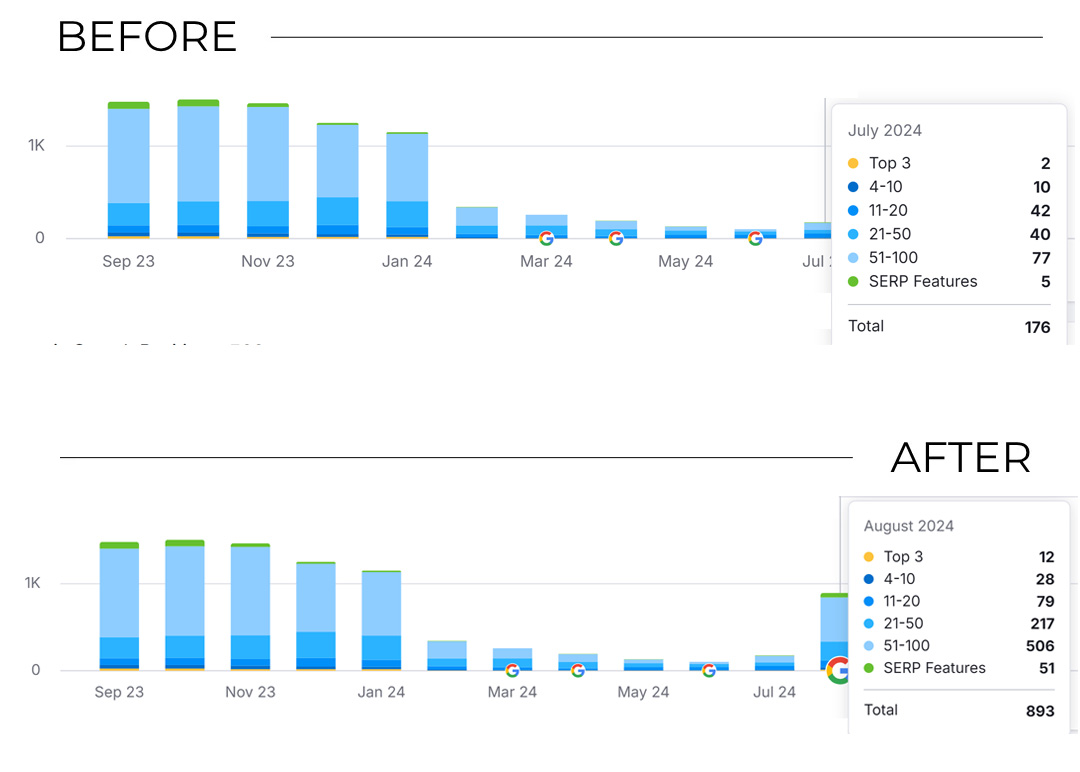
Verified Imhoff evidence: Semrush tracked organic keyword totals dropping before HTW restored valuable pages and URLs. The screenshot compares July and August 2024 rankings. It is third-party ranking data, not Search Console clicks or conversions.
Clicks fell; impressions held
Investigate search-result presentation, click-through changes, changing SERP features, branded demand and position shifts before rebuilding a page.
Pages or queries disappeared
Inspect indexation, removed content, changed URLs, redirects, robots directives and WordPress templates. Often the affected landing pages reveal the failure.
GA4 fell; Search Console did not
Check tracking, consent tools, channel attribution and reporting changes. A measurement problem should not trigger a costly SEO rebuild.
Different Symptoms. Different Next Steps.
What we look for: Did clicks fall while impressions held steady? Did impressions and rankings collapse for a section of the site? Or did Analytics drop while Search Console remained stable? We also check whether the dates line up with a release, an outage or a Google update. Google explains the differences between Search Console clicks and Analytics sessions.
A 97% Traffic Drop, Then a WordPress Recovery: The Imhoff Story
After a five-page replacement wiped out much of Imhoff Painting’s valuable content and URLs, Google organic traffic fell from over 300 daily visits to fewer than 10. We traced the damage to missing pages, lost URL destinations and broken links, then rebuilt the site around the assets worth retaining. Roughly 300 daily organic visits returned within about a month of our relaunch. Read the full Imhoff case study.
HEAR IT DIRECTLY FROM THE CLIENT
When the “Traffic Problem” Was Missing Pages
“Look at what happened to my traffic when I went back to Hog the Web... Boom!”
Doug Imhoff, founder of Imhoff Fine Residential Painting. He describes the search visibility crisis following a replacement website and what changed after HTW rebuilt the site.
THE OTHER SIDE OF THE STORY
What Happens When a Redesign Forgets the Existing SEO?
Imhoff Painting's replacement site reduced a content-rich website to roughly five pages without preserving critical old URLs. Organic visits fell from more than 300 per day to fewer than 10. We later rebuilt valuable pages and URL paths, restored traffic to around 300 daily visits within about a month of relaunch, and improved tracked conversions by 75% versus the original site.
The screenshots below show the original website and our eventual WordPress rebuild, not the failed five-page replacement. The difference we emphasize is the decision to retain useful content and URLs while making the experience better. Read Imhoff's full case study.


WE DON’T PRESCRIBE THE SAME FIX FOR EVERY DROP
Is the Problem in WordPress, in Search, or in the Reports?
An SEO traffic drop is a symptom. The most useful service starts by assigning each clue to the right category and confirming it before changing sitewide settings.
WORDPRESS
Technical breakage
Fix what changed
A plugin, theme update, noindex rule, redirect, deleted page, broken sitemap, canonical setting, server error or accidental staging directive may explain sudden losses.
SEARCH
Ranking / demand shifts
Investigate the pattern
Algorithm updates, competitors, search demand and SERP presentation can cause losses without any code breaking. We assess the pages and queries instead of blaming WordPress automatically.
ANALYTICS
Measurement mismatch
Check tracking first
GA4 consent changes, broken tags, filters or attribution differences can create an apparent crash. We verify whether the missing visits also show up in Search Console data.
Our starting point is a dated list of observations and likely causes, not a promise that we can restore a fixed percentage of traffic.
WORDPRESS-SPECIFIC TECHNICAL INVESTIGATION
We Check the Site Itself, Not Just the SEO Dashboard
When a drop lines up with a WordPress change, development access matters. These are typical investigation areas, not an automatic list of things that must be changed on every site.
Crawling and indexability
We inspect robots rules, noindex tags, WordPress reading settings, XML sitemaps, server responses and crawl obstacles. Search Console tools help confirm which pages Google can reach.
URL and content changes
We compare important old pages with current destinations, redirects, internal links, canonicals, removed content and archive structures. If a change caused the loss, we plan a relevant fix.
Theme, plugins and rendering
We look for recent template changes, plugin conflicts, unwanted redirects, JavaScript-dependent content and changes to navigation or internal discovery.
Security, speed and stability
Uptime failures, hacked content, malware warnings and server problems may affect visibility. We distinguish genuine crawl or security issues from everyday speed-score fluctuations.
WHAT WE REVIEW BEFORE WE RECOMMEND WORK
What We Need to Narrow Down the Cause
We start with available data and a change history. Even without perfect tracking, a dated timeline helps us distinguish a single-template bug from an across-the-board search decline. Google recommends comparing similar periods before drawing conclusions.
Search Console comparisons
Compare clicks, impressions, pages, queries and device/search-type segments. Prioritize pages with the largest losses, not just an overall sitewide percentage.
Analytics and conversions
Check GA4 organic sessions, landing pages, events, tags and consent configuration. Separate business-impact changes from data collection issues.
Website and release timeline
Review recent redesigns, migrations, content edits, WordPress updates, plugin changes, site outages and changes made by outside vendors.
Search and security context
Check Google update dates, manual actions, security notices, competitors and search demand. Core updates are not the same as a site being technically broken.
OUR WORKFLOW
From Traffic-Drop Investigation to Tested WordPress Fixes
You should know what was observed, what is still uncertain, and why a proposed change is worth making. When a technical issue is clear, we can implement and test it rather than handing over an audit for someone else to execute.
1. Confirm the decline
Compare the correct channels and time periods. Identify the dates, landing pages and queries responsible for the lost visibility or leads.
2. Isolate likely causes
Investigate WordPress changes, indexation, redirects, content changes, security notices and external search conditions. Separate confirmed issues from hypotheses.
3. Repair what is actionable
Restore relevant content, fix URL destinations, correct technical directives or improve genuinely weak pages when evidence supports those actions. Back up first.
4. Verify and monitor
Recheck affected URLs, Search Console, organic landing pages and lead tracking. Explain what has changed and what needs more time or follow-up.
Not all drops are fixable through a WordPress setting. For broad search-system changes, Google advises against reactionary quick fixes. Improvements may take weeks or months to be reflected in Search results; outcomes cannot be guaranteed.
Hear From Clients About Our WordPress and SEO Work
The following six testimonials cover different kinds of WordPress development, SEO investigations and long-term website support. They are not all traffic-recovery cases; Doug Imhoff’s recovery story appears with his case study above. Browse our verified client reviews.
DCAC Live
“They dug into our SEO ... and found issues we didn't even know we had.”
Applied Marketing Science
“I can't say enough good things about the Hog the Web team. They're flexible, communicative, and they offer great ideas and advice.”
The Leelanau School
“They feel less like a contractor and more like a partner who's genuinely invested in helping us”
The French Library
“We've been working with Hog the Web for the past five years and it's been a really good experience for us.”
Follow the Money
“We will be using Hog the Web for many many years to come, and we highly, highly recommend them for you as well.”
WHEN TO CALL, AND WHAT TO EXPECT
We’ll Tell You When the Right Answer Is “Don’t Change Anything Yet.”
A steep traffic drop deserves attention, but not every movement needs an emergency rebuild. If your clicks fell because demand declined, a Search Console reporting quirk appeared, or a core update just finished, our recommendations should reflect that. If WordPress is the cause, we can also handle the development work. See our broader WordPress SEO services.
Help Us Identify What Changed
Bring the Drop, the Dates, and Your Site
A link to your site, when you first noticed the decline, a recent change history and any accessible Google Search Console/GA4 reports make a useful starting point. Tell us whether Google clicks, GA4 sessions, form inquiries or all three fell. We will discuss a sensible investigation scope before assuming the fix.
“We have had fantastic experiences working with Hog the Web for work on several websites. HTW is highly knowledgeable, responsive to our needs, and able to work quickly and accurately within very tight deadlines.”
— Liz Alverson, verified written review
YOUR QUESTIONS, ANSWERED
WordPress Traffic Drop Recovery FAQs
We start with evidence, avoid premature promises and recommend the smallest sensible next step. Here are the questions website owners usually need answered before hiring someone to investigate.
Why did my WordPress website traffic suddenly drop?
Possible causes include changed or removed pages, indexing directives, WordPress updates, server problems, security issues, Google updates or demand changes. The first task is to confirm which channels, pages and dates actually declined instead of assuming one cause.
Can you recover Google traffic lost after a WordPress update or plugin change?
If an identifiable update caused crawl, indexation, URL or content problems, we can investigate and fix what is technically actionable. Recovery is not guaranteed, and rankings may take time to respond after a fix.
What if Google Analytics dropped but Search Console looks normal?
That can point to measurement or attribution differences, broken tracking, consent changes, or differing definitions of clicks and sessions. We check the instrumentation before prescribing SEO changes. Google explains how the two tools differ.
Do you diagnose traffic drops caused by Google core updates?
Yes. We review timing, affected pages and queries, content usefulness, competition and search demand. We do not treat each update as a technical error or promise an algorithm recovery. Google’s core-update guidance discourages reactive changes without proper assessment.
Will you make the fixes or only deliver a report?
Our WordPress development and SEO teams can implement approved changes, not just identify them. The scope depends on findings and agreed priorities; some search-demand or competitive issues may call for ongoing content and positioning work rather than a technical repair.
How do you tell a real traffic loss from tracking problems?
We compare GA4 and Search Console trends, look at organic versus total traffic, inspect tracking and consent configuration, and check landing pages and lead events. Different data sources may disagree without either one being broken.
What data should I provide to start?
Ideally your website URL, approximate date of the drop, access to Search Console and analytics, a list of recent WordPress/content changes, and any examples of lost ranking pages. We can discuss options if some data is unavailable.
How long does traffic recovery take?
Technical problems may be identified or fixed quickly, but Search re-crawling and reassessment can take longer. Broad quality, demand or competition changes may take months and may not fully reverse. The timeline depends on the actual cause.
Do I need a new website or a full SEO campaign?
Not necessarily. A lost URL or misplaced noindex may call for a targeted fix, while a wider decline may require content, technical and strategic work. We recommend scope based on the evidence, not a blanket package.
Is this different from SEO recovery after a redesign or migration?
Yes. This service diagnoses unexplained declines from many possible causes. For a confirmed bad redesign, see redesign SEO recovery. For migrations, diagnosis also includes URL mapping and transfer history.
Can you fix hacked-site traffic declines or security warnings?
We can investigate WordPress security issues, malware-related problems and the resulting technical effects. The right plan depends on the incident; security cleanup and search re-evaluation are separate steps. See our WordPress maintenance and support offerings.
Traffic Down? Let’s Find Out What Changed.
Tell us when it started, what dropped and whether your WordPress site changed around the same time. We’ll help distinguish technical issues from wider search changes, prioritize what matters, and implement the fixes that make sense.