Why Is Your Website Traffic Down? 9 Reasons and How to Fix Them
Key Takeaways
- Most traffic drops fall into two buckets: gradual slides and sudden plunges.
- Google updates, competition, and changing user behavior are common culprits.
- Technical mistakes during website changes can kill your rankings overnight.
- Sometimes, the problem is just bad tracking—not lost traffic.
- Keeping content fresh and monitoring competitors helps protect your site.
If your website traffic suddenly dropped, or has been slowly declining over time, don’t panic just yet. There are a lot of moving parts behind website traffic, and in many cases, the issue can be fixed once you identify what’s actually causing it.
Sometimes it’s a Google algorithm update. Other times it’s a technical SEO issue, broken tracking, outdated content, or competitors slowly outranking you over time. We’ve even seen cases where traffic “drops” were really just reporting errors inside Google Analytics.
The important thing is not to guess.
In this guide, we’re going to break down the most common reasons website traffic drops, how to diagnose each one properly, and what you can do to start recovering your rankings, leads, and visitors before the problem gets worse.
First: Confirm the Traffic Drop
Before assuming your rankings crashed, it’s important to confirm what actually changed. Not every traffic decline is caused by SEO problems — sometimes the issue is seasonal, technical, or even just a tracking error.
Start by checking the following:
- Google Search Console impressions and clicks
- Whether all traffic dropped or only organic traffic
- Recent plugin, theme, or website changes
- Google Analytics tracking code functionality
- Website uptime and server performance
- Any recent Google algorithm updates
- Whether the decline is seasonal or industry-wide
If your traffic dropped suddenly overnight, the cause is often technical or algorithm-related. Gradual declines, on the other hand, are usually tied to outdated content, stronger competition, or changing search behavior.
Once you confirm the pattern of the traffic loss, the sections below will help you identify the most likely cause and how to fix it.
Why Your Website Traffic Is Gradually Dropping
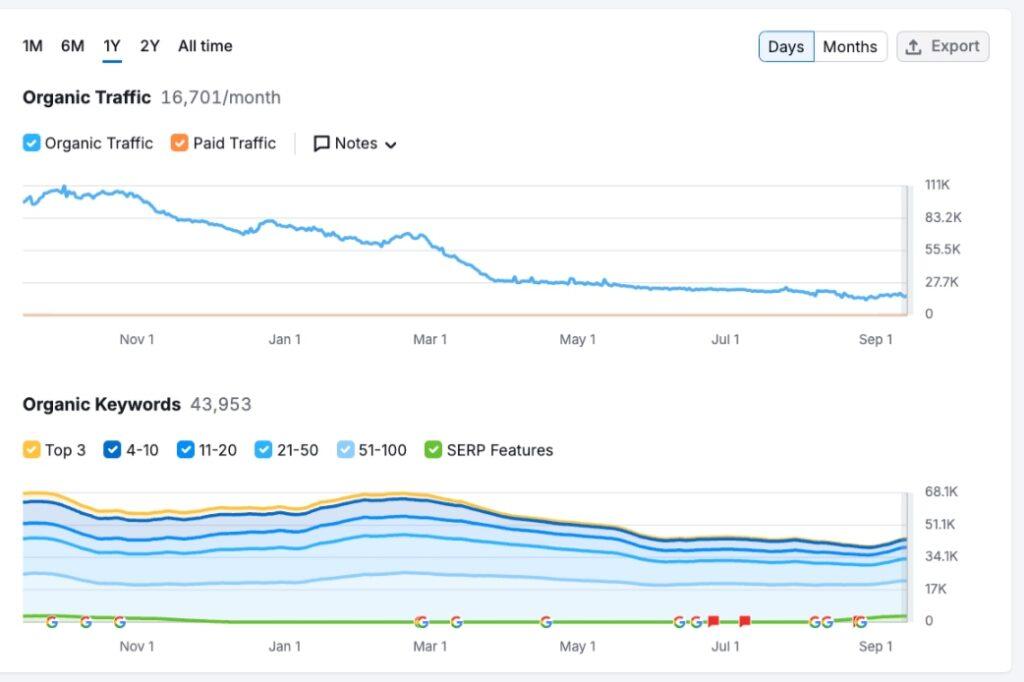
Gradual drops usually creep up on you. They’re often caused by how people search changing, seasonal patterns, SEO being ignored, or just hungry competitors. Let’s look closer:
How to Spot Gradual Drops
Check your analytics platforms. Is your traffic chart looking like a gentle downward slope instead of a cliff? That’s a gradual decline. Split your data between branded and non-branded searches:
- Branded Traffic: Are fewer people searching for your company by name?
- Non-Branded Traffic: Are new customers finding you less often?
If both are dropping, there’s likely more than one reason.
Common Causes of Gradual Decline
Here’s what might be going on:
| Cause | What It Looks Like | Fix It By |
|---|---|---|
| Old Content | Outdated blog posts | Refresh & update your articles |
| Google’s Constant Tweaks | Slow decrease in keywords | Ongoing WordPress SEO |
| Changing Search Behavior | Lower clicks, new features | Optimize for AI and new platforms |
| Seasonality | Dips around holidays | Adjust plans for “slow” months |
| Competitor Momentum | Lost rankings | Check what competitors are doing |
Instead of panicking, work through them one by one. Outdated content is super common. At Hog the Web, we often audit older posts—sometimes just adding images, tweaking sections, or updating facts gives rankings a boost.
The Rise of AI Search
AI tools like ChatGPT now handle a jaw-dropping number of searches daily. Google is also showing AI-written overviews right at the top of results. What does that mean for you?
- Fewer clicks from Google because people get instant answers.
- Winning spots in these AI snippets matters more now.
Pro Tip: Use tools like our free AI traffic checker tool to monitor how your brand appears in AI-generated search results and overviews. As AI search continues to evolve, tracking visibility outside traditional rankings is becoming increasingly important.
Beating Seasonality
Some industries get hammered at certain times of the year (air conditioning in winter, anyone?). For less obvious seasonality, check if your visitors dip in December or during school breaks. Use that time to improve your site, run email promos, or refresh your offers so you’re ready when the surge returns.
Sudden Traffic Drops: The Steep Cliff
A sudden nosedive in traffic is terrifying. Nine times out of ten, here’s why it happens:
The Main Culprits
- Google Algorithm Updates: Google rolls out big updates (“core” and “broadcore”) that can make rankings swing overnight. Some sites jump up—others crash.
- Manual Penalties: Rare, but it happens when Google thinks your site broke the rules (spammy links, bad tactics). You’ll get a notice in Google Search Console.
- Technical SEO Mistakes: Launching a new site? Changing platforms? If you mess up redirects or don’t move your content, Google can’t find your good stuff anymore.
- Tracking Errors: Sometimes the traffic is fine, but your analytics tool broke after a website update or a new cookie popup blocked tracking.
Fixing Sudden Traffic Drops
If your traffic drops overnight, here’s a quick disaster check:
- Did Google do an update?
- Check online for recent algorithm changes. If yes, wait a week or two. Sometimes things settle down.
- Check Search Console for Penalties.
- Review Website Changes in the Past Month.
- Launched a new design or switched software? Test for broken redirects and missing pages.
- Audit Tracking Codes.
- Install a backup analytics tool if you’re unsure.

Keeping Your Site Safe (And Your Traffic Coming In)
Here’s my go-to checklist to keep website traffic healthy:
- Regularly update or refresh important pages.
- Track your main keywords and watch for drops.
- Run quarterly competitor audits.
- Before changing your website, use a site migration checklist.
- Validate your analytics after any code change.
All of those may sound boring, but skipping them is like ignoring oil changes in your car. In some cases, traffic drops can also be caused by malware, hacked pages, spam injections, or other hidden website security issues that impact your rankings without you realizing it. If you suspect your site may have been compromised, you can run a free website security scan to check for common vulnerabilities and security problems.
What To Do If Your Website Traffic Drops
- Don’t panic. Step back and gather info.
- Follow the checklists above.
- Get expert help if things stay broken. Sometimes it’s a technical fix beyond DIY.

Website traffic drops can be frustrating, but most causes can be identified once you separate tracking problems, technical issues, ranking losses, algorithm changes, and changing search behavior. The sooner you identify which pages and queries actually lost visibility, the easier it is to build a focused recovery plan.
When Should You Hire an SEO Professional to Diagnose a Traffic Drop?
You should consider professional SEO help when the cause of a traffic decline is unclear, the drop is severe, or your rankings have not recovered after you’ve ruled out basic tracking and seasonal issues. Traffic losses caused by indexing problems, redirects, website migrations, algorithm changes, technical SEO issues, lost content, or declining rankings often require a deeper diagnosis than simply updating a few pages.
A good SEO investigation should compare Google Search Console and analytics data before and after the decline, identify which pages and queries lost visibility, review recent website changes, check crawlability and indexation, and determine whether competitors or changes in search behavior are contributing to the loss.
This is also an area where WordPress-specific experience matters. Plugin changes, redirects, theme updates, accidental “noindex” settings, site migrations, and deleted pages can all create search problems that aren’t obvious from traffic reports alone.
Hog the Web’s WordPress SEO services include traffic-loss diagnosis, technical SEO fixes, content recovery, on-page optimization, and ongoing search visibility monitoring.
A Real Example of Recovering Lost Organic Traffic
We’ve seen how dramatic a traffic collapse can be. A painting company we worked with had previously received more than 300 organic visits per day to their website before traffic fell to fewer than 10 daily visits. Our recovery work included analyzing Google Search Console data, restoring valuable content, repairing URLs and redirects, preserving backlink equity, and improving the site’s SEO foundations.
The site ultimately recovered to more than 300 organic visits per day, while leads increased 70% compared with the original website. You can see more details in our WordPress SEO case studies.
Frequently Asked Questions About Website Traffic Drops
Why did my website traffic suddenly drop?
A sudden drop in website traffic is often caused by a Google algorithm update, technical SEO issue, tracking error, website outage, or accidental indexing problem. Start by checking Google Search Console and Google Analytics to determine whether the drop affects all traffic or just organic search traffic.
Can a Google update reduce website traffic?
Yes. Google core updates can significantly impact rankings and organic traffic, especially if your content no longer matches search intent or competitors provide more helpful, up-to-date information. Traffic drops after an update are very common.
How do I know if my website traffic drop is seasonal?
Compare your traffic to the same period last year using Google Analytics or Search Console. Some industries naturally experience seasonal fluctuations in search demand, while others may see traffic changes due to trends or economic shifts.
Why are my impressions stable but clicks dropping?
If impressions remain steady while clicks decline, your rankings may have shifted slightly lower, your title/meta description may have a low CTR, or AI Overviews and SERP features may be reducing clicks for informational searches.
Can technical SEO problems cause traffic loss?
Absolutely. Broken redirects, slow loading speeds, crawl errors, indexing problems, noindex tags, and server downtime can all hurt search rankings and reduce website traffic.
How long does it take to recover lost website traffic?
Recovery time depends on the cause. Technical fixes can sometimes restore traffic within days or weeks, while recovering from a major Google algorithm update may take several months of SEO improvements and content updates.
Can outdated content cause traffic to decline?
Yes. Older content can gradually lose rankings if competitors publish more current, comprehensive, or better-optimized pages. Updating outdated pages is often one of the fastest ways to recover lost organic traffic.
What tools should I use to diagnose a traffic drop?
The best tools for diagnosing website traffic declines include:
- Google Search Console
- Google Analytics
- Ahrefs
- Semrush
- PageSpeed Insights
- Screaming Frog SEO Spider
These tools can help identify ranking losses, indexing issues, technical problems, and keyword declines.
Should I panic if my website traffic drops?
Not necessarily. Small fluctuations are normal. The most important thing is identifying whether the decline is temporary, seasonal, technical, or algorithm-related before making major SEO changes.