WE CAN HELP
WordPress Migration
SEO Recovery
Lost Google traffic after moving your website to WordPress, switching domains, changing URL paths, or moving hosts? We identify what changed during the migration, repair SEO-impacting issues, and implement the fixes in WordPress. One team for the investigation and the technical work.
Already launched? See which type of move went wrong, or view a real URL-and-content recovery project.



Domain + URL
Lost paths, redirect maps and canonical signals
CMS → WP
Content, metadata and permalink parity
Hosting
Crawl access, redirects and deployment errors
SEO + Dev
We diagnose issues and implement WordPress fixes
The Migration Is Finished. Your Rankings Are Not Where They Were.
A migration can be a host change, a new domain, a different content management system, or a restructured set of URLs. Those moves can all disrupt search visibility, but the right diagnosis is different for each one. A hosting switch with unchanged public URLs is not the same SEO problem as moving a thousand pages from another CMS into WordPress.
We compare the pre-migration and current site, look for which URLs and queries lost visibility, and fix the issues we can verify. Google’s hosting-change guide and Google’s URL-changing migration guide deliberately treat those situations separately. Our recovery service does too.
FIRSTHAND URL-RECOVERY EXPERIENCE
What Happens When a Migration Loses Valuable Pages?
One client project shows how serious the damage can be. Imhoff Fine Residential Painting went through a failed website redesign that removed most of its ranking pages and old URL destinations. This was a redesign and URL/content-loss recovery, not a documented hosting or domain transfer. Those missing URLs and content are also frequent causes of failed CMS migrations.
Where search equity was lost
A rushed replacement reduced a content-rich site to roughly five pages. Service pages, blog content and old backlink destinations disappeared.
- 300+ daily organic visits fell below 10
- Old inbound links hit missing pages
- Hundreds of relevant URLs and topics went missing
What HTW actually fixed
Our team recovered useful content and repaired its WordPress implementation rather than handing off a spreadsheet of recommendations.
- Restored key service and blog content
- Rebuilt practical URL paths and appropriate redirects
- Reconnected internal navigation and improved conversion paths
What was measured
This was an unusually strong client outcome, not a promise for every failed migration.
- Traffic returned to roughly 300 daily visits within a month
- Semrush keyword counts: 176 in July → 893 in August 2024
- Tracked conversions +75% vs. the original site
The site can look fine while the SEO footprint is gone
These are real Imhoff site screenshots. The visible design was only part of the problem. Important service content and URLs that had built search equity no longer existed on the replacement website.

Earlier Imhoff website. The screenshot cannot show its full search footprint: dozens of service pages, hundreds of posts and valuable inbound link destinations.

HTW WordPress rebuild. We restored useful content and URL pathways while improving the customer experience rather than simply copying the old homepage.
97% traffic loss, then a measurable recovery
Organic visits had fallen from more than 300 a day to fewer than 10 after the unsuccessful rebuild. HTW reconstructed important service and blog content, restored URL paths where practical, fixed relevant redirects and internal links, and rebuilt the WordPress site.
Within approximately a month after the late-July 2024 relaunch, organic traffic was back near 300 daily visits. Tracked conversions later increased 75% compared with the original, pre-crash site (GA4 conversion events, excluding spam submissions). Read the complete Imhoff recovery case study.
Search visibility returned as important pages came back
The graph compares Semrush organic keyword counts immediately before and after the July 2024 relaunch. A separate Ahrefs estimate below illustrates the direction of the earlier collapse and recovery.
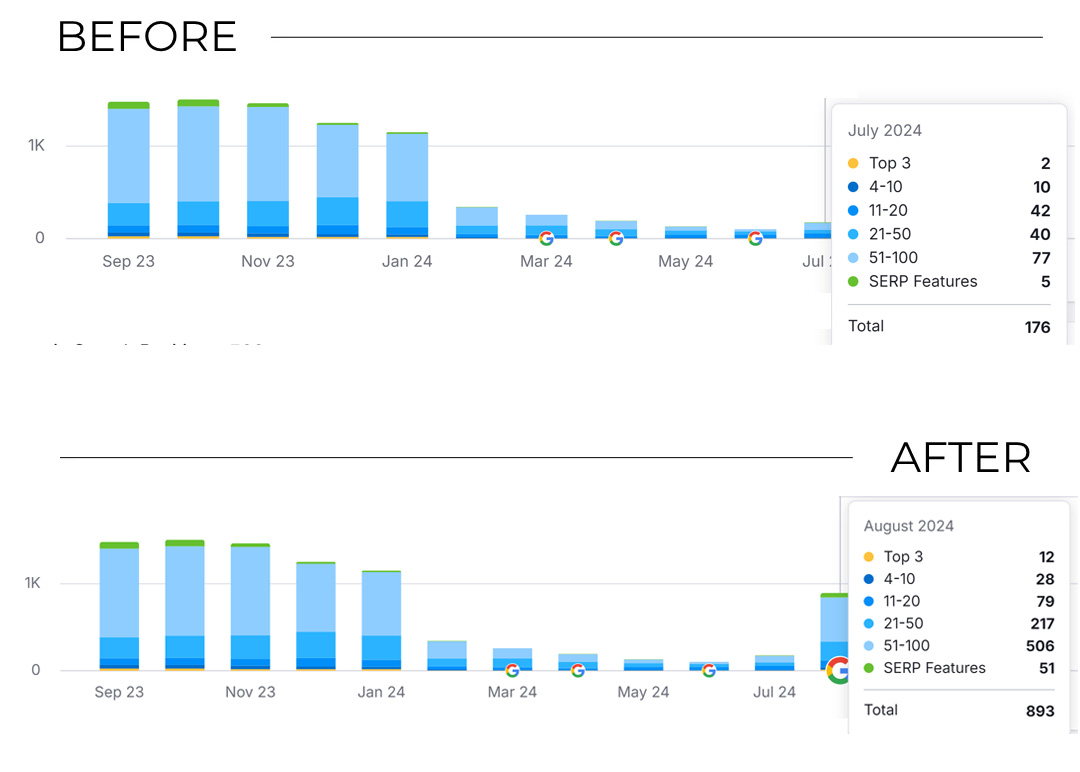
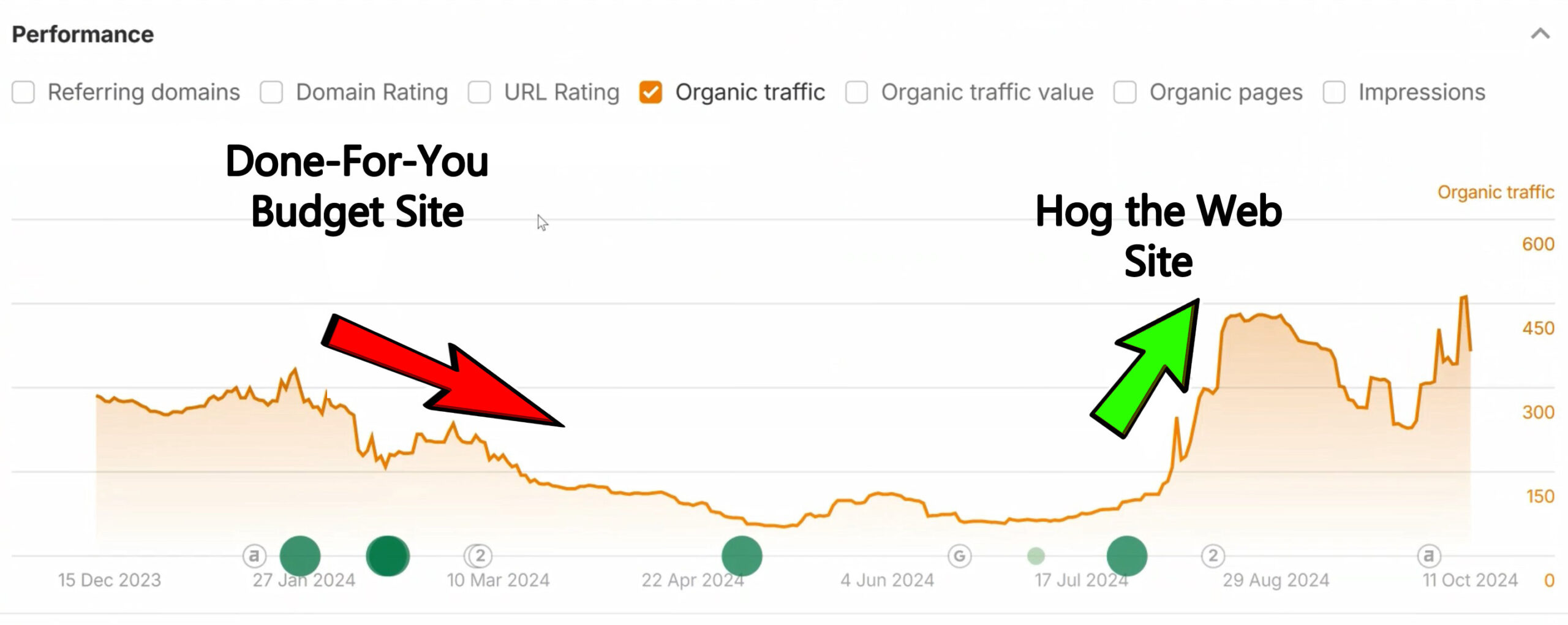
Chart source: Ahrefs estimated organic traffic, December 2023–October 2024. This is third-party estimated traffic, not exact GA4 sessions. The case study explains the measurement context.
Actual Clients. Actual WordPress and SEO Work.
Doug Imhoff describes the result after we rebuilt and repaired his site. We have kept the original video testimonials from our clients, including projects involving website development, technical SEO and ongoing support.
Imhoff Fine Residential Painting
“Look at what happened to my traffic when I went back to Hog the Web... Boom!”
DCAC Live
“They dug into our SEO ... and found issues we didn't even know we had.”
Applied Marketing Science
“I can't say enough good things about the Hog the Web team. They're flexible, communicative, and they offer great ideas and advice.”
The Leelanau School
“They feel less like a contractor and more like a partner who's genuinely invested in helping us”
The French Library
“We've been working with Hog the Web for the past five years and it's been a really good experience for us.”
Follow the Money
“We will be using Hog the Web for many many years to come, and we highly, highly recommend them for you as well.”
MIGRATION FAILURE POINTS
What Gets Lost During a WordPress Migration?
A domain change, CMS switch and hosting transfer create different risks. We investigate the failure mode that matches the move instead of assuming every traffic drop requires the same redirect checklist.
Old URLs No Longer Resolve
CMS migrations can change file extensions, categories, permalink patterns and product/service URLs. Important pages can disappear even when a new homepage loads fine.
- Check old-to-new URL mappings
- Test 301/308 destinations and redirect chains
- Find former backlink destinations returning 404s
The Wrong Domain or URL Version Wins
An HTTP-to-HTTPS, www/non-www or domain move can introduce inconsistent signals. Google’s redirect documentation explains which responses communicate a permanent move.
- Inspect canonical destinations
- Check host/protocol variants
- Verify relevant permanent redirects
Imported WordPress Content Changes
Moving from another CMS can drop useful on-page content, navigation paths, image text, titles, structured data and internal links.
- Compare historical and current page substance
- Review titles, headings and internal-link structure
- Repair WordPress templates and media URLs
Google Cannot Crawl or Index Key Pages
Staging noindex settings, robots rules, incorrect canonicals, server errors or a stale sitemap can hide migrated pages. Google’s canonicalization documentation explains how duplicate URL signals work.
- Test indexability and status codes
- Check XML sitemaps and canonical tags
- Resolve staging and rendering problems
DIAGNOSIS BEFORE PROMISES
We Trace the Migration, Not Just the Ranking Graph.
Before repairing anything, we find out exactly what moved, when it moved, and what existed before it. Google’s traffic-drop diagnostic guide also reminds site owners that changes in search demand, tracking and ranking systems can coincide with a launch. We account for those possibilities. See also our guide to other causes of website traffic drops.
Identify the Kind of Move
Was this a DNS/hosting switch, HTTP-to-HTTPS rollout, domain transfer, CMS-to-WordPress import or a URL restructuring? The answer determines the checks.
- Confirm launch, DNS and cutover dates
- Check whether the public URLs actually changed
- Inspect previous and current setups when available
Build a Lost-URL Crosswalk
We compare historical sitemaps, crawls, Search Console data, analytics and backlinks with the new WordPress URLs.
- Find former organic landing pages
- Map old URLs to relevant new destinations
- Identify URLs worth recreating instead of redirecting
Inspect Search Signals End to End
We test real HTTP responses, canonical signals, noindex and robots controls, redirect chains, navigation, XML sitemaps and content parity.
- Validate old and new site properties in Search Console
- Check WordPress permalink and SEO-plugin settings
- Spot thin content or vanished internal links
Separate Errors From Normal Reprocessing
Temporary URL-move volatility is possible. A persistent decline with broken redirects or blocked destination pages is a different issue.
- Compare queries and pages, not only sessions
- Account for changed GA4 configuration
- Prioritize issues with evidence and business impact
HOW WE REPAIR IT
From Migration Forensics to WordPress Fixes
An SEO audit is only useful when somebody can implement its findings. We pair search analysis with WordPress development, so the same team can work on redirects, templates, content, site architecture and indexation controls.
01. Establish the before/after
Confirm the migration timeline, the original URL inventory, the pages that drove relevant traffic, and whether the loss affects specific sections or the entire domain.
02. Rebuild the redirect and page map
Create a practical crosswalk for changed URLs. Restore important pages where appropriate and redirect moved content to its closest genuine replacement. No mass redirects to irrelevant homepages.
03. Implement fixes in WordPress
Repair redirects, permalink rules, canonical/robots settings, plugin configuration, templates, internal links, missing content and other verified migration problems.
04. Validate and monitor
Recrawl the affected paths, check Search Console indexation and search trends, and monitor whether Google discovers and processes the fixes. Google’s recrawling guidance notes that indexing requests are not guarantees.
We prioritize site-specific issues; the exact work depends on the migration type, historical evidence, the new site’s condition and access to both environments.
THREE VERY DIFFERENT SCENARIOS
What Kind of Migration Caused Your SEO Drop?
The word “migration” covers several technical projects. Here is how we distinguish them before recommending any repair work.
HOSTING / DNS MOVE
Same URLs
WordPress moved to a new server
If the public URLs did not change, a huge redirect project may be unnecessary. We first inspect DNS cutover, response errors, crawl access, SSL, caching and performance.
DOMAIN / URL MOVE
Old → new
New domain or permalink patterns
We map historical pages to genuinely matching destinations, verify server-side redirects, reconcile canonical and XML sitemap signals, and review old/new GSC properties.
PLATFORM / CMS MOVE
CMS → WP
Moving content into WordPress
We check whether page intent, internal linking, body copy, images, metadata, structured data and useful URL paths survived the import into WordPress.
A hosting switch usually needs a different recovery plan from a domain move or CMS transfer. The scope is based on what changed and what broke, not a one-size-fits-all package.
PROJECT SCOPE & FIT
Do You Need a Redirect Repair, Content Recovery or a Deeper Fix?
Some migrated sites need a small set of canonical or redirect corrections. Others need dozens or hundreds of historical pages reconstructed. If the URL structure never changed, the investigation may focus on deployment issues rather than redirects. We assess scope before recommending work.
This service is primarily for search visibility lost after a completed move. If your migration has not yet happened, we can discuss prevention and launch planning through our WordPress design and development team. If the site has broader ongoing SEO needs, see our WordPress SEO services.
Useful details to share
We Can Start With the Evidence
- Your current URL and (if different) the former domain
- What changed: host, CMS, domain, URL paths, or more than one
- Approximate migration/launch date and any drop screenshots
- Google Search Console and GA4 access if available
- Old sitemap, crawl export or backup if you have one
Do not worry if the previous agency did not provide a redirect map. We can start by determining what evidence is still available.
QUESTIONS AFTER A MOVE
WordPress Migration SEO Recovery FAQs
Practical answers about hosting switches, CMS transfers, changed URLs, domain moves and the work involved in repairing lost visibility.
Can SEO rankings recover after a WordPress migration?
Often, yes, especially when the lost visibility can be traced to missing URLs, faulty redirects, removed content or accidental indexing restrictions. Some fluctuation while Google processes a move is normal. The amount and timing of any recovery depend on the actual problem and the new site.
Does changing WordPress hosting require 301 redirects?
Usually not when visitors and search engines still use exactly the same public URLs. Hosting-only moves call for DNS, server response, availability, SSL, caching and crawl-access checks. Redirect mapping becomes important when URLs, hosts or protocols change.
Why did my rankings fall after changing domain names?
Google must discover and process the new URL locations. Missing one-to-one redirects, inconsistent canonical signals, internal links pointing to old URLs and indexability problems can prolong or worsen the change. We assess the source and destination properties and mapping rather than assuming all movement is permanent.
Can you recover SEO after moving from Wix, Squarespace or another CMS to WordPress?
We can investigate losses associated with the transfer to WordPress. We compare previous content and URL structure with the WordPress site, review redirects, metadata, internal links, indexation and other migration signals. Whether specific pages or rankings can be recovered depends on what changed and what evidence survives.
What if old pages are gone and the previous site cannot be accessed?
We may be able to reconstruct an inventory from previous sitemaps, Search Console records, available backlinks, archives or backups. It is not always possible to reproduce every lost page, and not every old URL should be restored. We prioritize pages with genuine search and customer value.
Should all old URLs redirect to my new homepage?
No. Old URLs that moved generally need redirects to equivalent or closely relevant destinations. Redirecting unrelated content to one homepage often produces a poor experience and can be treated as a soft 404. A genuinely retired page may deserve an appropriate 404 or 410 instead.
How do you diagnose a migration traffic drop?
We establish the launch timeline and type of move, compare historical and current URLs and Search Console data, check status codes and redirects, inspect indexability and canonical signals, and review content parity. We also rule out tracking problems, seasonality and other causes.
Will I need to migrate the site again?
Not necessarily. Many issues can be corrected in the current WordPress build. We would only recommend a bigger rebuild or migration if the present architecture makes the necessary repair work impractical or the larger business need justifies it.
How long does Google take to process a site move?
There is no guaranteed timetable. Google notes that a medium-sized site may take a few weeks for the new URLs to be noticed, and larger or more complicated moves can take longer. Broken URL mappings or blocked pages may delay progress. We monitor the actual indexation and search data rather than giving a universal deadline.
Is this the same as the website-redesign SEO recovery service?
They overlap when a redesign also changes or removes URLs and content. This service is centered on the technical consequences of a migration: domain, host, CMS, protocol and URL changes. The redesign-recovery service focuses more on damage from a replacement design and loss of previously ranking content. We do not recommend paying for two separate projects when the same repair plan would solve both.
Can you guarantee that all of our old Google rankings will return?
No. We can diagnose and repair the problems we find, but Google determines crawling, indexing and ranking. Competitors, content quality and other factors may have changed during the migration. We will explain what can be verified and what remains uncertain.
Did the Migration Cost You Google Traffic?
Tell us what moved, when it happened, and what you have seen in Search Console. We can investigate the changes, prioritize repairs and, where it makes sense, implement the fixes directly in WordPress.