WordPress Migration SEO Recovery
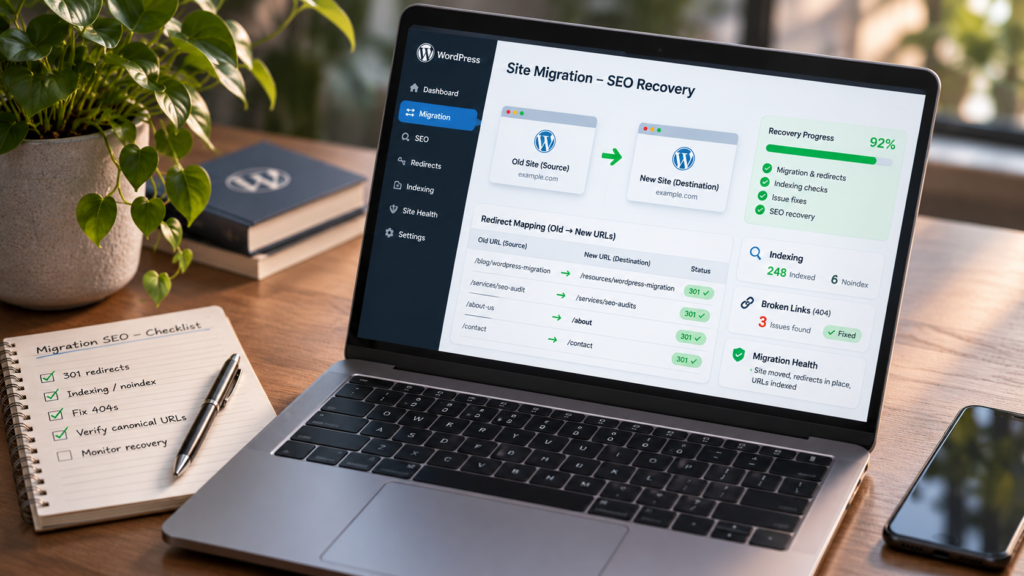
A successful WordPress migration can provide a fresh start. It should never be an excuse to lose years of hard work to achieve high rankings on Google. However, migrations often don’t go as expected. Business owners can launch a great-looking new website with everything functioning well, but within weeks they start losing organic traffic.
At Hog the Web, we know even a small migration mistake can hurt a website’s SEO. When you miss redirects, set up indexing incorrectly, or delete pages, you affect how Google crawls your site and where it shows up in search results.
We’ve worked with over 300 companies for 10 years, so we understand what it takes to use WordPress for search engine optimization (SEO) and technical issues. When our clients lose search rankings after moving hosts, we don’t just point out the issues; we use our WordPress expertise to fix them.
Did Your WordPress Migration Cause Your Rankings to Drop?
A sudden drop in rankings after you move your site is usually due to technical issues when Google reprocesses your site. Before taking further action, determine what caused the decline.
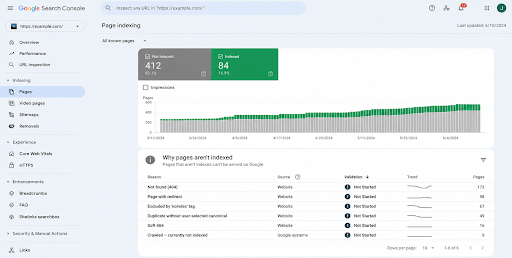
The first step in comparing your organic traffic prior to and after the transition is to use Google Search Console. Google Search Console will allow you to see what pages have had changes in terms of click volume, impression volume, and/or ranking.
Beyond understanding how the decrease affects your site overall, pay close attention to whether the decline affects the whole site or only a few pages. For example, if your home page continues to do fine but your service pages no longer appear in search results, you may be having issues redirecting users to other parts of your website, or indexing may not be working correctly.
According to Google’s website migration guidance, ranking fluctuations are normal while search engines process URL changes. However, ongoing traffic losses deserve closer investigation.
What Common WordPress Migration Mistakes Hurt SEO?
Most migration problems aren’t caused by one dramatic mistake. They’re usually several smaller issues that go unnoticed during launch.
Why Do Missing 301 Redirects Affect Rankings?
In the absence of a correct redirection plan when you modify the location (URL) of your website pages, Google will have difficulty associating those pages with their new locations.
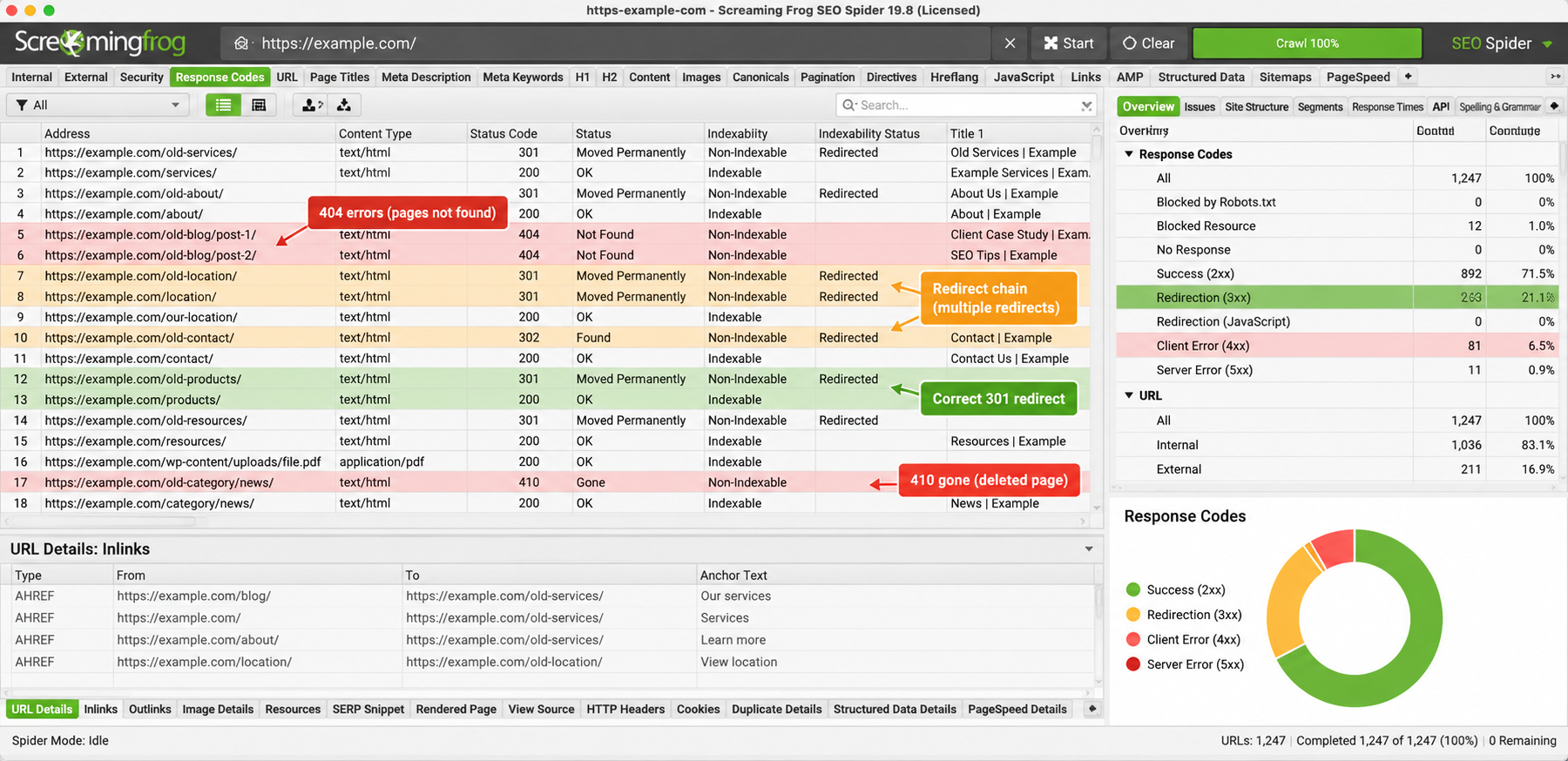
Imagine that you had a service page that was once found under the URL /website-services/ but is now located at /services/. If you don’t set up a 301 redirect for this change, some users will likely get a 404 error when they try to access the old URL.
Redirecting all previous pages to your main site doesn’t work as a way to handle expired links. For each major URL, redirect it to a similar page.
Google recommends using permanent, server-level redirects to avoid redirect chains. Note that a hosting-only migration that preserves the exact same URLs does not require a URL redirect map, distinguishing pure infrastructure/hosting changes from URL-changing moves per Google’s documentation.
Can Incorrect Noindex Settings Remove Pages From Google?
Yes. A “noindex” command will inform search engines that the page should not be included in their indexing process.
WordPress developers usually block search engines like Google from indexing their staging site before launch. However, the problem occurs when they forget to unblock after launch.
We confirm that WordPress Reading Settings, SEO Plugin Settings, and individual page directives allow the search engine to continue indexing your key content.
How Do Canonical Tags and Internal Links Cause Problems?
Google uses canonical tags to determine which version of a webpage is primary. However, if those canonical tags point to your old domain name or a test site, they can send mixed signals.
Internal links can also cause similar confusion if they point to an old URL.
We will also examine XML sitemaps, missing images, and structured data. Although these items aren’t usually apparent to users, they matter for how search engines assess a newly migrated site.
Can Deleted Content Cause a Major SEO Traffic Loss?
Absolutely. Removing established pages during migration can eliminate valuable search visibility, especially when those pages previously attracted visitors and backlinks.
We’ve seen this firsthand with Imhoff Fine Residential Painting.
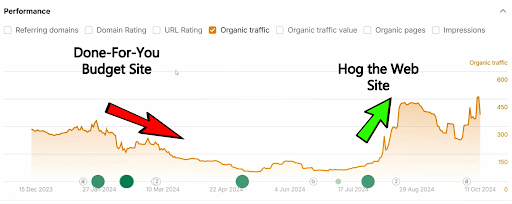
The old website had hundreds of pages, but another provider replaced it with a new five-page site. Organic visits dropped from over 300 per day to fewer than ten.
Google hadn’t lost its taste for business. Rather, it seemed that some valuable pages, URLs, and other content were gone.
Hog the Web subsequently recovered the lost SEO assets and rebuilt the site, relaunching it in late July 2024. Organic traffic recovered within approximately one month, returning to about 300 daily visits along with improved lead generation.
This is an example of what can happen during a site redesign, but the same issue can also arise during a migration from one WordPress installation to another.
You should check if the pages that you are going to delete or combine have any significant traffic, links to them from other websites, or customer inquiries prior to taking action.
How Does Hog the Web Recover SEO After a Failed Migration?
First, we identify exactly what was modified. Random changes made without understanding why can cause more issues.
How Do We Identify What Went Wrong?
We can start by comparing the historical Search Console data with our current Search Console performance. This will help us identify which pages have been removed from the index, which queries have stopped appearing in search results, and when traffic began to decline.
Afterward, we’ll examine both the current and previous site structures. We will specifically look for broken links, redirect problems, unlinked sitemaps, page backups, improper canonicalization, and/or indexing restrictions.
Historical site maps, backup copies, and archived versions of a site may assist in reconstructing what the site looked like prior to being migrated.
How Do We Repair the Website?
Once you identify which parts of your site require improvement, we’ll create a list of proposed improvements and then order that list based on the potential impact each improvement could have on improving your site’s search visibility. Examples of how we might improve your site’s search visibility include rebuilding deleted pages, correcting misdirected redirects, updating internal links, repairing damaged canonical tags, and correcting incorrect WordPress configuration settings.
The SEO audit will provide a list of recommended enhancements; however, we can make the appropriate WordPress changes.
We can now check whether we have fixed every problem. We will also monitor our indexing progress, our search engine rankings, and how many people come to us naturally through Google Search Console.
Should You Reverse a Failed WordPress Migration?
Not always. If you return to the earlier site, you may face even more problems than you’re trying to fix.
It would make sense to correct the remaining problems with the new website (redirections, missing content, etc.) if the new site functions correctly and there are very few other problems.
A rollback may be needed if the migration caused many technical problems or if you can’t re-implement critical functionality.
Before offering options for repair, partial restoration, or a complete reversal of the migration process, we will assess the current condition of each version.
How Long Does WordPress SEO Recovery Take?
Recovery time varies based on how much has changed and how quickly Google processes your request to correct the data.
Although certain technical problems can be fixed in a few days, it may take weeks or even months for each search engine results page to show improved visibility of your website.
Google said that after a website moves, it can take time to crawl and update the index. If the owner of the website has updated many of their URLs, then the time will be longer.
Rather than make promises about where your site will rank or when it will bounce back, our goal is to find what’s wrong, fix it, and keep track of how things are getting better.
How Can You Prevent SEO Problems During Your Next Migration?
Before you change your site’s layout, it is best to understand what makes up your site. This will help prevent errors.
Before beginning the migration process, we recommend reviewing which pages are most successful, saving any information you believe could be beneficial to you, documenting the new URL for each page, and testing the redirect(s).
The same applies to making sure you have a backup of your site, checking your indexing options, evaluating how effectively you can keep your analytics data up to date, and continuing to evaluate how your site performs in search results once it launches.
The most effective way to migrate your site is to maintain your current search visibility while improving your existing site.
Need Help Recovering Your WordPress Rankings?
When a migration fails, you don’t necessarily have to start over. Often, the most crucial part of the process is identifying what you lost and fixing the technical problems preventing Google from indexing your pages.
We provide comprehensive support for your website after you migrate it to our platform. We offer WordPress development services and SEO expertise to help you overcome the issues that come with migrating your site.
Lost traffic after moving your website? Visit hogtheweb.com to discuss what happened and how we can help get your WordPress website back on track.